
Put AI agents to work inside your business.
Custom AI agents built around how your team actually works, deployed into the tools you already use.
Start with sales. Find the right buyers, engage them in natural conversations, qualify opportunities, and move more prospects toward becoming customers.
Expand into customer service and other business workflows as you grow.
AI Customer Service AgentsNia· Lifelike AI SDR
Works inside the channels and tools your business already uses
AI agentsBusiness workflowsIntegrationsGovernanceOne system.
One AI sales team. From finding buyers to winning more customers.
Whether Dapto discovers a new prospect or someone reaches out to your business, our AI agents engage, qualify, book and follow up, keeping opportunities moving through one connected sales process.
Dapto found an opportunity
Northwind Logistics
New sales leadership and active SDR hiring detected
Elena Ruiz · VP RevenueRelevant decision-maker identified
“What if your new team could identify expanding shippers and have tailored outreach ready to review?”
- Personalised outreach approved and sent
- Elena replied: interested
A buyer contacted your business
Ridgeway HVAC
Started a conversation on your website
“We're managing schedules for 35 field technicians using spreadsheets.”
- Nia discovers requirements and buying timeline
- Operations manager added to the decision
- Qualified, demo requested for Thursday
Nia · your lifelike AI SDR
Engages interested buyers in natural conversations, understands their needs and takes the next step, on your website, by phone and by email.
- Engage
- Qualify
- Book
- Follow up
- Hand off
Working towards a qualified meeting
Your sales team receives the buyer's requirements, the conversation history and the next action.
Illustrative examples.
From finding customers to keeping them.
Traditional tools handle prospecting, inbound inquiries, sales follow-up and customer support separately. Opportunities can get lost between teams and systems.
Dapto connects those workflows with AI agents that share your business knowledge and work inside your existing tools.
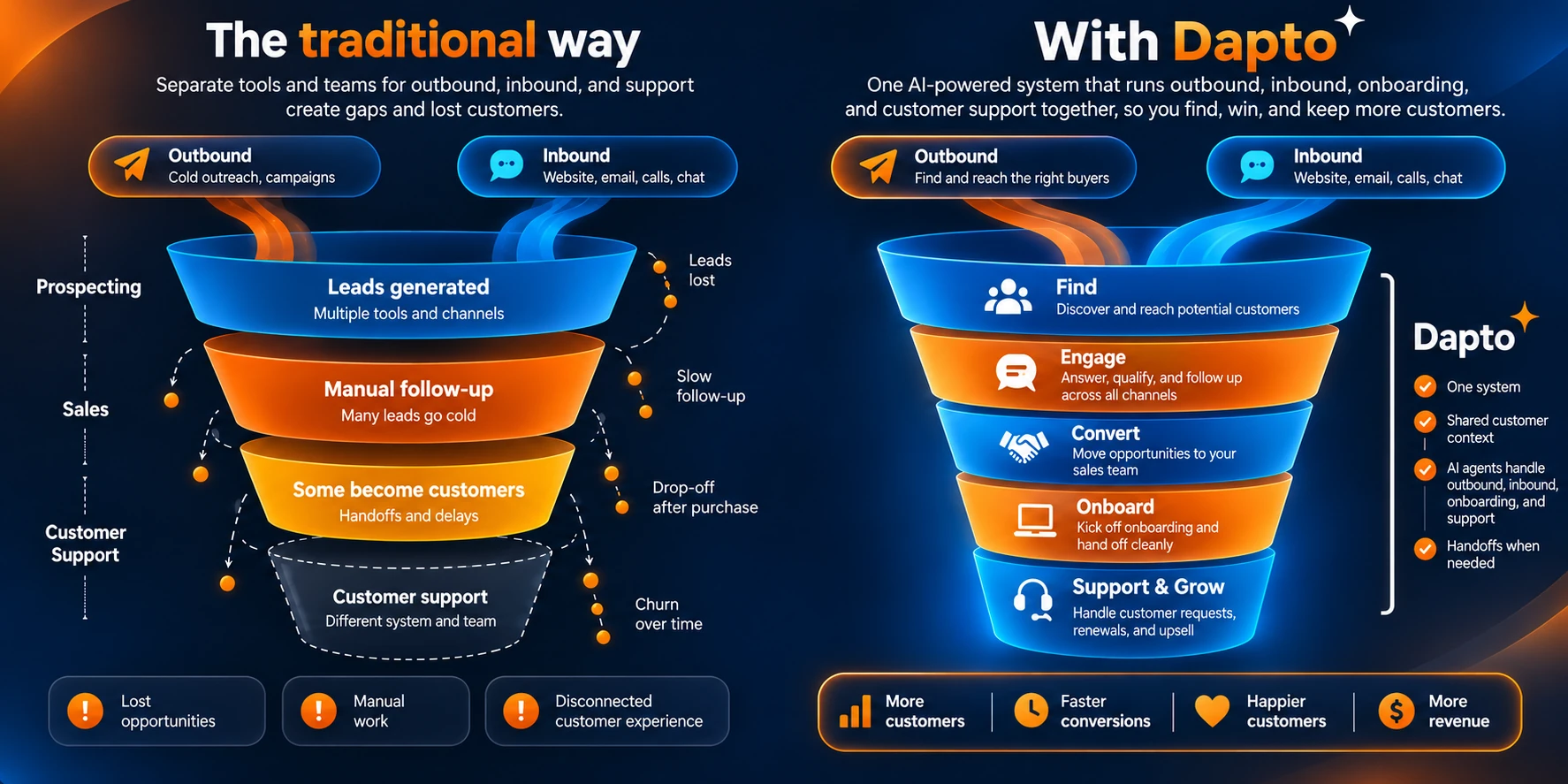
Start with AI Sales Agents to find, engage and convert more opportunities. Extend into Customer Service to support and grow those relationships.
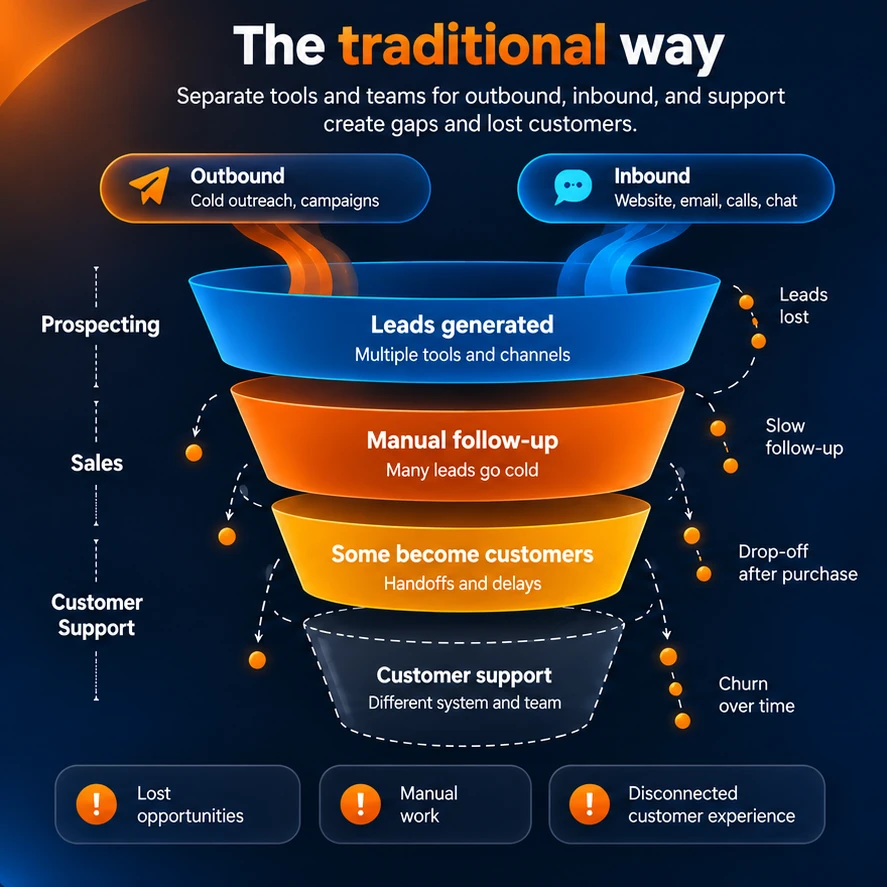
The traditional way
Separate tools and teams for outbound, inbound and support create gaps and lost customers.
- Prospecting: leads generated across multiple tools and channels, and leads lost.
- Manual follow-up, where many leads go cold.
- Some become customers, after handoffs and delays.
- Customer support on a different system and team, with churn over time.
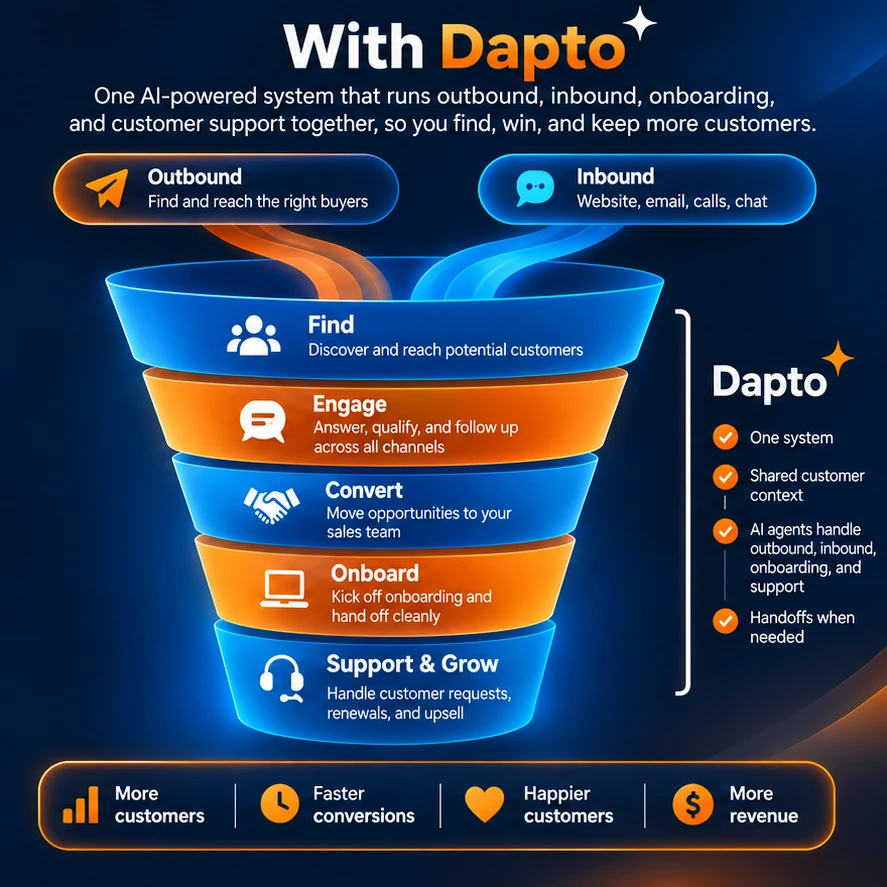
With Dapto
One AI-powered system runs outbound, inbound, onboarding and customer support together, so you find, win and keep more customers.
- Find: discover and reach potential customers.
- Engage: answer, qualify and follow up across all channels.
- Convert: move opportunities to your sales team.
- Onboard: kick off onboarding and hand off cleanly.
- Support and grow: handle customer requests, renewals and upsell.
Five stages. One customer history.
Follow one customer from the first buying signal to an answered support request, and see which agents do the work at each stage.
Customer won
Find:Signal spotted: Ridgeway is hiring field technicians.
IllustrativeOne Brand Core and one customer history at every stage. No starting over.
One Brand Core. Start with sales. Expand from there.
Your business's second brain
Brand Core
Everything your business knows, in one place. Your sales, customer service and custom agents all think with it, so they sound like you and follow your rules.
Built from your
- Website
- Documents
- Libraries
- Products and pricing
- Policies
- Brand voice
AI Customer Service Agents
Support customers after the sale.
Resolve routine issues, answer requests, route exceptions and reduce repetitive support work across chat, email, phone and WhatsApp.
A natural next step after Dapto AI Sales Agents.
- Built-in helpdesk
- Hands off to your team with the full history
Custom AI Agents
Automate the work around the sale.
Automate a specialised workflow across documents, operations, reporting, approvals and the systems you already run.
- Designed around how your team works
- Deployed into your existing tools
Replacing your CRM, help desk, ERP or email platform is usually unnecessary. Dapto sits between the tools your team already uses, does the work across them, and hands people the decisions.
Your systems
- CRM
- Website
- Phone
- Calendar
- Help desk
- ERP
- Documents
- Databases
- APIs
Dapto
The operations layer that does the work
- Agents
- Knowledge
- Orchestration
- Business rules
- Security
- Evaluation
Sales
Takes the meetings
Support
Handles the exceptions
Operations
Approves what matters
AI built around your business, not the other way around.
End-to-end workflows
We look past the single task and automate the whole process wherever it makes sense.
Built around your systems
We connect to the tools and data your business already uses. Nothing to migrate.
People stay where they matter
Agents work on their own where it is safe and hand decisions to a person when judgment is needed.
Designed for production
Monitoring, evaluation, permissions, knowledge management and security are part of the build, not an add-on.
AI Governance
Guardrails on every agent we deploy
Agents only touch what they are allowed to, and a person approves anything that matters. Built into every deployment, with stricter controls for enterprise teams.
Available for enterprise deployments- Control what each agent can see and do
- Set policies per workflow
- Log and monitor every action
- Evaluate outputs before they ship
- Require approval for sensitive steps
- Protect sensitive information
Start with one workflow. Prove it, then expand.
No long project and no system migration. We configure agents around how your team already works and start small.
- 01
Discovery
We look at how you find and convert customers today and pick one workflow worth starting with.
- 02
Configuration
Agents are set up on your Brand Core, connected to your CRM and calendar, with your approval rules in place.
- 03
Pilot
A narrowly scoped pilot with success measures agreed up front. You see every conversation and approve what goes out.
- 04
Improve and expand
We review results with you, tune the agents, and add the next workflow once the first one is working.
Most businesses run on people chasing work. The next ones will run on agents doing it.
Common questions from teams exploring AI agents.
What is Dapto?
Dapto builds custom AI agents that do real work inside your business, in the tools you already use. Our flagship is AI Sales Agents: they find relevant prospects, prepare personalised outreach for your approval, talk with buyers on your website, phone and email, qualify them and book meetings. We also offer AI Customer Service Agents and custom agents for other workflows. Every agent shares one Brand Core, your business's second brain.
What kinds of AI agents does Dapto build?
Three kinds. AI sales agents, often called AI SDRs, that spot buying signals, research accounts, draft outreach, talk with prospects face to face, on the phone and by email, qualify them and book meetings. AI customer service agents with a built-in helpdesk that answer and resolve customer requests on chat, email, phone and WhatsApp. And custom agents for operations work such as documents, reports, approvals and system updates, all on the same Brand Core.
What is Brand Core?
Brand Core is your business's second brain: one shared source of truth built from your website, documents, libraries, products and pricing, policies and brand voice. Every Dapto agent works from it, so they give consistent answers, sound like you and follow your rules.
How does a Dapto implementation work?
We start with one workflow. A discovery call to understand how you find and convert customers, or the workflow you want automated. We then configure the agents on your Brand Core, connect your systems and set your approval rules, and run a scoped pilot with success measures agreed up front. From there we improve the agents and expand. Nothing goes live without your approval.
What happens in the AI Opportunity Audit?
For larger custom projects we start with an AI Opportunity Audit. It is a working session, not a sales pitch. We go through how your work runs today, measure where time and money are lost, identify where an agent could realistically take over, which systems it would need to connect to, and what to build first.
How long until an agent is live?
It depends on the workflow and the systems involved. Because most deployments start from agents we have already built, they move faster than a build from scratch. Our Customer Service Agents can be running the same day if you start them yourself.
How much of my team's time does this take?
Your team gives us context on the workflow and access to the right systems in a few working sessions, then reviews test results and approves each stage of the rollout. We handle the design, build and deployment.
Does it work with the systems we already use?
Yes. Agents connect to your CRM, inbox, phone, website, calendar, ERP, documents, databases and internal tools through their APIs and integrations. You don't have to migrate anything.
How is our data protected?
Agents work inside the permissions you set and only get the access they need. Sensitive steps can require a person's approval, and every action is logged so it can be monitored and audited.
Can I start on my own first?
Yes. Our Customer Service Agents are available self-serve as Dapto Frontdesk, with a 7-day trial. Each agent runs on its own, and you can add more with our team whenever you're ready.
How is pricing set?
Self-serve Customer Service Agents (Dapto Frontdesk) start at $39 a month. AI Sales Agents and custom implementations are priced on the workflows, systems and volume involved, and we share the price once the scope of your pilot is clear.
Sell AI to your clients without building the AI team.
Dapto becomes the AI practice behind your firm, so you can take on AI projects without hiring an AI team or paying for one between projects. Want more margin? Add offshore development.
- No AI team to hire
- You own the client and the price
- Optional offshore development for more margin
See the AI Sales Agents at work, or talk to us about another workflow that matters to your business.
- 1Start with one painful workflow
- 2Prove the value
- 3Then expand